Your character changed between shots. Here is how to put them back.
01What breaks
The same person, slightly someone else
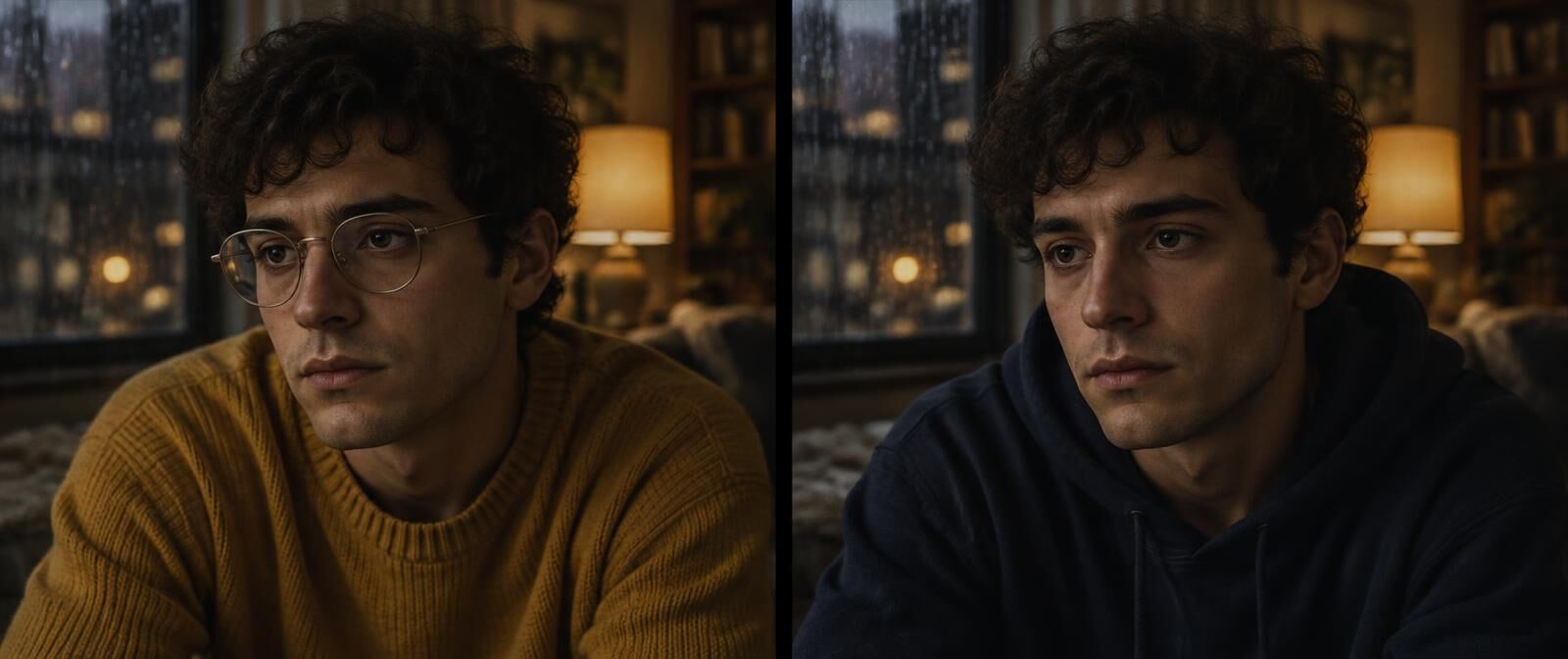 Shot 02 · 0:07Shot 11 · 0:52
- Face
- The jaw gets softer, the eyes move apart, and by shot twenty it is a cousin.
- Hair
- The parting swaps sides. A fringe grows in. Curls relax into waves.
- Wardrobe
- Colour, pattern, collar, sleeves, buttons. Knitwear is a repeat offender.
- Accessories
- Glasses, rings, watches, earrings. The small things leave first.
- Build and age
- Shoulders widen, a beard thickens, ten years arrive between two cuts.
02Why it happens
Every shot starts from scratch
A video model makes each shot on its own. It reads the prompt, maybe looks at a reference image, and gets to work. It does not remember what Leo looked like in the shot it made ten minutes ago, so every shot is a fresh guess at the same description.
Most guesses are close. Close is the problem. A slightly different collar is easy to miss in one shot and very easy to see when two shots sit next to each other in the cut. Over forty shots, close turns into a different person.
Keeping people consistent from the start is its own topic, with its own page: character consistency across shots. This page is about what to do once the drift is already in your cut.
03How to fix it
Six steps, by hand
- 01
Pick the reference
The first clear look at the person: face visible, well lit, the outfit easy to read. Every later shot gets compared with this frame, so choose it like you mean it.
- 02
Find every shot that disagrees
Hold each appearance up against the reference, never against the shot just before it. Comparing neighbours lets a sweater drift a shade at a time with every step looking fine.
- 03
Write one instruction per break
The shot and the time, what is on screen, what was set earlier and where, and what to change. Name the reference frame. Then say that everything else stays as it is.
- 04
Redo only that shot
Regenerate or edit the one shot with the reference frame attached. Keep the framing, the camera move and the length. Leave the rest of the video alone.
- 05
Check the face first
Faces are where a redraw is most likely to go wrong. Look at the new shot next to the reference, then next to the original, and make sure it is still the same person.
- 06
Drop it back in and watch the cuts
Play the shot before, the new shot and the shot after. If the cut in or out jumps, trim a frame or two.
Here is what step three looks like when it is written properly. Every fix in a VideoConsistency report is written in this order, so it can go straight into your next generation.
Shot 11, 0:52.0 to 0:56.0. Leo is wearing a navy hoodie and no glasses. He was established in a mustard yellow knit sweater and round silver glasses in shot 2 at 0:07.0, and nothing in the story explains the change. Match him back to shot 2 at 0:07.0, using that frame as the reference. Everything else in the shot stays as it is.
04Or press the button
All six steps, behind Fix this shot
The report finds every shot where a person stopped matching their first clear look and writes the fix. Press Fix this shot under it and one of the best frontier video editing models redraws that shot with the reference frame attached.
You get a low-res draft first, next to your original. An automatic check then looks hardest at the face. If the person in the draft looks like someone else, or their hands, clothes or position changed when they should not have, it says so before you spend anything on the full-quality file.
Shot fixing is in its last round of testing and switches on for plan holders next. Finding the breaks and the written fixes work today.
- Finds itEvery appearance held against the first clear look, with the two frames side by side.
- Writes itOne fix per break, in the order above, naming the frame to match.
- Redraws itThe one shot, with the reference frame, changing only what broke.
- Checks itFace, hands, wardrobe, props, placement and the rest, against your original.
05Questions
Common questions
Why does my AI character look different in every shot?
Because each shot is generated on its own. The model gets your prompt and maybe a reference image, but it does not remember the twenty shots it made before. Small differences pile up, and a long video gives them plenty of room to pile.
How do I fix a character's face in one shot?
Take the frame where the face looked right, attach it as the reference, and redo only the broken shot with one instruction: match the person to that frame and change nothing else. Then check the new shot against both the reference and the original before you use it.
Can I fix a character's outfit without regenerating the scene?
Yes. A wardrobe fix only needs the one shot where the outfit changed. Describe the garment from the reference in plain words, colour, pattern, collar, sleeves and buttons, and ask for only that to change.
What reference image should I use?
The first clear appearance of the person in your video, face visible and well lit. A frame from the video itself beats a separate portrait, because it carries the same light, lens and grade as the shots you are fixing.
Can VideoConsistency fix the character for me?
Yes. The report flags every shot where a person stopped matching their first clear look, with two frames and a written fix. Under each fix is a Fix this shot button that redraws the shot to match, shows you a draft first, and checks that the face and everything else stayed put.
Keep reading
Find and fix
How a broken shot gets redrawn, with a real before and after.
Character consistency
Why people drift across shots, and what holds them in place.
Fixing backgrounds
Walls, windows, light and set dressing that drift while nobody looks.
Redo one shot
Replace the shot that broke and leave the rest of the cut alone.
Find out which shots your character broke in
Upload the cut and every appearance gets checked against the first clear look. The report comes back in a few minutes for most clips.